Creating a Website
I learnt how to make websites with HTML + CSS 3 years ago
And I now wish I never touched fully hard coding websites - and not just because AI now exists
It’s because of Hugo
Hugo has relit a fire that I thought went out when ChatGPT first launched and I found out it could code a website that would take me days in a matter of seconds, but Hugo is just something different, and has allowed me to actually write information down and blog stuff for other people to read… like you are doing now!

For anyone who doesn’t know:
Hugo is a framework built on the go language that can turn regularly written, easy to make .md markdown files into lovely static website pages. You can customise it with CSS as mentioned before but I think it is a very lightweight and great alternative to say WordPress, which I did have this site
So why Hugo?
As I mentioned, I was rather unhappy with WordPress’ sloppiness so I shopped around, initally starting with Jekyll, but then I was looking for sites that used it and randomly went to Jeff Geerling ’s website and was suprised as to how fast the pages loaded… and then luckily and very kindly he snuck in his about page as to how he is using Hugo for his sites.
How do I use Hugo?
First I installed it using a very simple brew install hugo which then obviously downloaded it and installed it. Then I ran hugo new project mysite and it made all of the files for this website - I mainly followed the Hugo docs
to get going.
Then I opened it in VSCode and edited to my choosing from there because you build templates for different types of pages like for example the blog template you are reading:
{{ define "main" }}
  <h1>{{ .Title }}</h1>
  <div class="post-meta">
    {{ with .Date }}<span class="date">{{ .Format "January 2, 2006 at 3:04 PM" }}</span>{{ end }}
    {{ if and .Lastmod .Date }}{{ if .Lastmod.After .Date }}
    <span> · </span><span class="lastmod">Updated {{ .Lastmod.Format "January 2, 2006 at 3:04 PM" }}</span>
    {{ end }}{{ end }}
    {{ with .Params.author }}<span> · </span><span class="author">{{ . }}</span>{{ end }}
    {{ with .Params.tags }}
    <div class="tags">{{ range . }}<a href="{{ "/tags/" | relURL }}{{ . | urlize }}" class="tag">{{ . }}</a>{{ end }}</div>
    {{ end }}
  </div>
  {{ .Content }}
{{ end }}
There are themes that you can find online on github and other places, but I am VERY minimalist with my design choices so I have kind of just built my own, I bridged a bit off others but mainly used the docs and some claude here and there to beautify and add some other little things like the dark/light mode toggle
If you are interested, here is what the folder hierarchy looks like:
  mysite/
  ├── .gitignore
  ├── archetypes/
  │   └── default.md
  ├── content/
  │   ├── _index.md
  │   ├── -posts.md
  │   ├── about.md
  │   ├── contact.md
  │   └── posts/
  │       ├── _index.md
  │       ├── creating-a-website/
  │       │   ├── cloudflare-pages.png
  │       │   ├── hugo.png
  │       │   └── index.md
  │       ├── making-a-youtube-downloader/
  │       │   ├── demo.png
  │       │   └── index.md
  │       ├── password-generator/
  │       │   └── index.md
  │       ├── the-3-AI-amigos/
  │       │   ├── proof.png
  │       │   └── index.md
  │       └── x32-scene-generator/
  │           ├── claude.png
  │           └── index.md
  ├── hugo.yaml
  ├── layouts/
  │   ├── _default/
  │   │   ├── _markup/
  │   │   │   ├── render-heading.html
  │   │   │   └── render-link.html
  │   │   ├── 404.html
  │   │   ├── baseof.html
  │   │   ├── contact.html
  │   │   ├── index.html
  │   │   ├── list.html
  │   │   ├── password-generator.html
  │   │   └── single.html
  │   └── partials/
  │       ├── contact-form.html
  │       ├── footer.html
  │       ├── header.html
  │       ├── password-generator.html
  │       ├── recent-posts.html
  │       └── socials.html
  ├── static/
  │   └── css/
  │       └── style.css
  └── wrangler.jsonc
(some sneak peeks of future posts included)
Why Hugo is so great
Well, besides it being blinking fast, it also allows me to write any posts or pages in markdown or .md files (as i mentioned earlier). This is great because a lot of apps like obsidian and loads of other places use this and it basically works where you use for example # to create a title and (a symbol I can’t type) to add a code block and loads of other stuff, there is geniunely so much you can do with markdown.
And then when I’m done writing, it just creates the webpage for me using my templates and bang, done!
How did I get the website online?
I first set up an account on github and then I created a private git repo
I bought my domain from cloudflare as it is the easiest to integrate with cloudflare DNS which provides the best industry standard DDOS protection - for free might I add, and they have great pricing (for me at least) because I am in the UK and the price is still in dollars, so £7.50 for a domain is absolutely great
Then, I can link my github repo to a cloudflare pages setting: 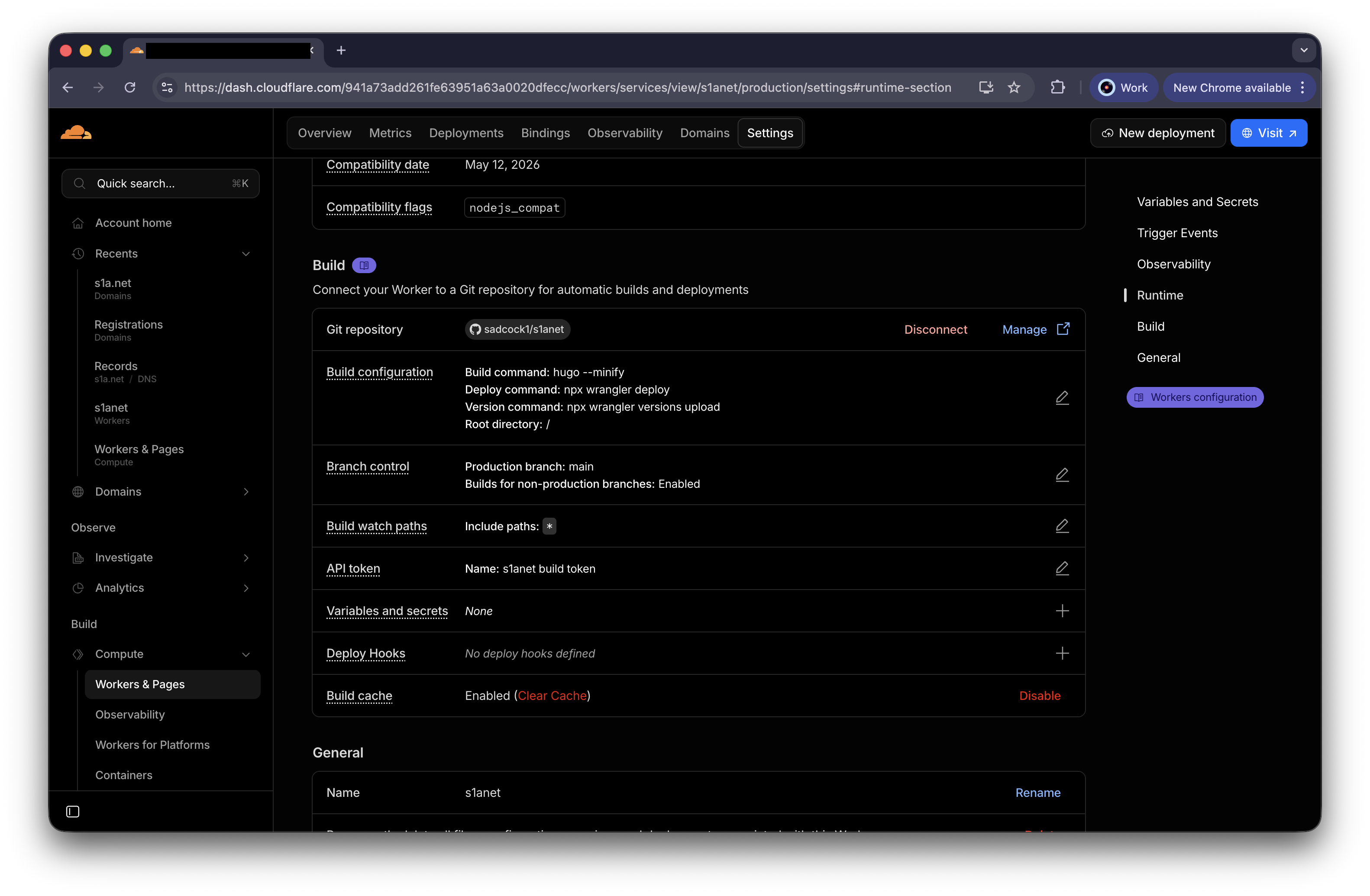 And then cloudflare handles pulling from github whenever I push from my computer automatically, making life really easy and allowing me to publish posts and whatever really nice and quickly
So, if you are interested in hugo and deploying your own rapid site, give it a go as I think it is well worth it
Contact me if you have any specific questions on how the website works, I would be more than happy to answer them!